
Fingertracking
from €3,390.50
Track hand orientation and finger positions — vibro-tactile or pure.
Playing the video transfers data to the video provider.
Optical finger tracking for immersive applications
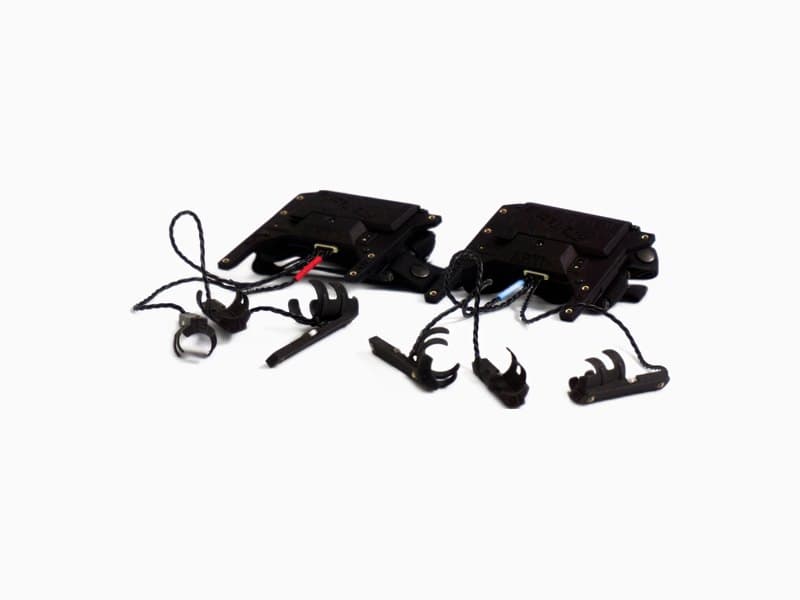
ART Fingertracking2 captures hand orientation and the position of individual fingers within an ART tracking system. Dorsal hand targets and finger thimbles with active markers make the movements visible to the tracking cameras. Hands can therefore be tracked together with the head, interaction devices, and other targets in one common coordinate system.
The distinctive advantage is at the fingertips: synchronised LEDs there are observed by the cameras. High accuracy is available exactly where the real hand interacts with virtual buttons and switches. The bend of each finger joint is calculated from fingertip position and dorsal hand pose using inverse kinematics. Strain-gauge gloves such as the CyberGlove, by contrast, derive finger pose from individual joint angles, so measurement errors accumulate from the base of the hand to the fingertips.
Users do not wear a closed glove that several people use in succession. The finger thimbles and dorsal hand target are open designs: worn individually and not integrated into a glove. That is more hygienic for changing users in demonstrations, training, and design reviews.
The video shows interaction with a virtual board in Unity inside an immersive projection environment. It illustrates that high interaction accuracy is achievable not only with a virtual environment fixed in the room, but also with moving, tracked virtual objects. Position data for all tracked objects and hands is output in one common coordinate system.
| Hand tracking solution | High accuracy for | Calibration | Application area |
|---|---|---|---|
| ART Fingertracking2 | Fingertips, back of hand | in DTRACK (approx. 3 min) | Interaction with virtual objects |
| Strain-gauge gloves | Joint angles | complex, requires experience | Interaction, gesture recognition |
| Markerless hand tracking | High accuracy not achievable | Not required | Gesture recognition |
Features and variants
- Three or five fingers: available in three-finger and five-finger configurations
- Optional tactile feedback: the three-finger tactile version uses vibration motors in the finger thimbles to signal contact with virtual objects
- Multi-user operation: supports up to two users or four hands
- Complete finger thimble sets: three-finger and five-finger sets in XS, S, M, and L are included
- Hand targets and wireless link: finger thimbles are connected to the dorsal hand targets by cable; the link between hand targets and the tracking system is wireless; power: two AAA rechargeable batteries per hand target; charger included
- ART camera compatibility: compatible with ARTTRACK6/M, AT7-80, AT7-50, ARTTRACK5, and ARTTRACK5/C at up to 300 Hz
- DTRACK compatibility: Fingertracking2 is supported in all DTRACK3 and DTRACK4 versions
- Software integration: DTRACK SDK, VRPN, and ART plugins for Unity and Unreal Engine
| Version | Finger frame rate at 300 Hz hand-target rate | Vibrotactile feedback |
|---|---|---|
| 3-finger | 100 Hz | No |
| 5-finger | 60 Hz | No |
| 3-finger tactile | 100 Hz | Yes |
The typical detection range is 4–5 m under the reference conditions specified in the datasheet. The range achieved in a project also depends on the camera, lens, target position, and LED setting.
Application fields
CAVE and powerwall interaction
In projection systems, finger tracking adds hand interaction to head and object tracking. Users can point at or grasp virtual components and evaluate operating concepts while remaining spatially aligned with the CAVE or powerwall. The real hand occludes the virtual hand there. Vibrotactile feedback at the finger thimbles reports contact with virtual objects even when that occlusion hides the virtual hand, which increases immersion. Example: the curved powerwall for aerospace simulation uses finger tracking for hand position and orientation in front of a large-format display.
Virtual development and design reviews
Virtual prototypes make it possible to investigate user interaction and human–vehicle workflows before a complete physical model is available. Example: in the Italdesign Concept Lab, finger tracking and a Flystick complement optical tracking for immersive design reviews.
Training and simulation
Precise finger movements may be required as input data for some training applications. Vibrotactile feedback reports contact with virtual objects back to the user's fingertips. The application software determines whether contact has occurred. Feedback from the application software to the user is transmitted wirelessly via DTRACK software. Example: the VR CAVE at BHT Berlin uses hand tracking in immersive training scenarios — from technical simulations to application-specific workflows.
Research, motion capture, and HRI
Finger tracking supports research into natural interaction, ergonomics, gesture control, and human–robot interaction (HRI). Example: at the University of Kassel HRI lab, finger tracking supports gesture-based teleoperation of mobile robots and drones. Related solution areas include Research & education and Robotics & HRI.
Integration with DTRACK4
Fingertracking2 operates with ART cameras in DTRACK3 and DTRACK4. The DTRACK SDK and VRPN support custom applications, while ART plugins connect Unity and Unreal Engine. See the DTRACK4 features for more information about device support, output formats, and plugins.
Downloads and next steps
- Fingertracking2 technical datasheet
- Fingertracking2 Tactile quick guide
- Discuss your project and system design
Frequently asked questions
Is Fingertracking2 the same as markerless hand tracking?
No. ART Fingertracking2 requires hand targets as hardware and typically measures fingertip positions in the 1 mm accuracy range. It is therefore particularly suited to manual interaction with virtual objects. Markerless hand tracking does not achieve comparable accuracy and is better suited to gesture recognition.
How many hands can be tracked at the same time?
The maximum system configuration supports two users or four hands.
Does finger tracking work in a CAVE or at a powerwall?
Yes, provided that the tracking volume and camera positions are designed appropriately for the project. The system is intended for immersive applications and can be combined with head, object, and interaction tracking.
How many tracking cameras should I use for finger tracking?
For meaningful work with ART Fingertracking2, tracking cameras should capture users' hands from upper front, upper rear, and lower front. We therefore recommend a system with at least six ART tracking cameras.